
SkyPay Developer Portal &
API v2.0 Integration Hub
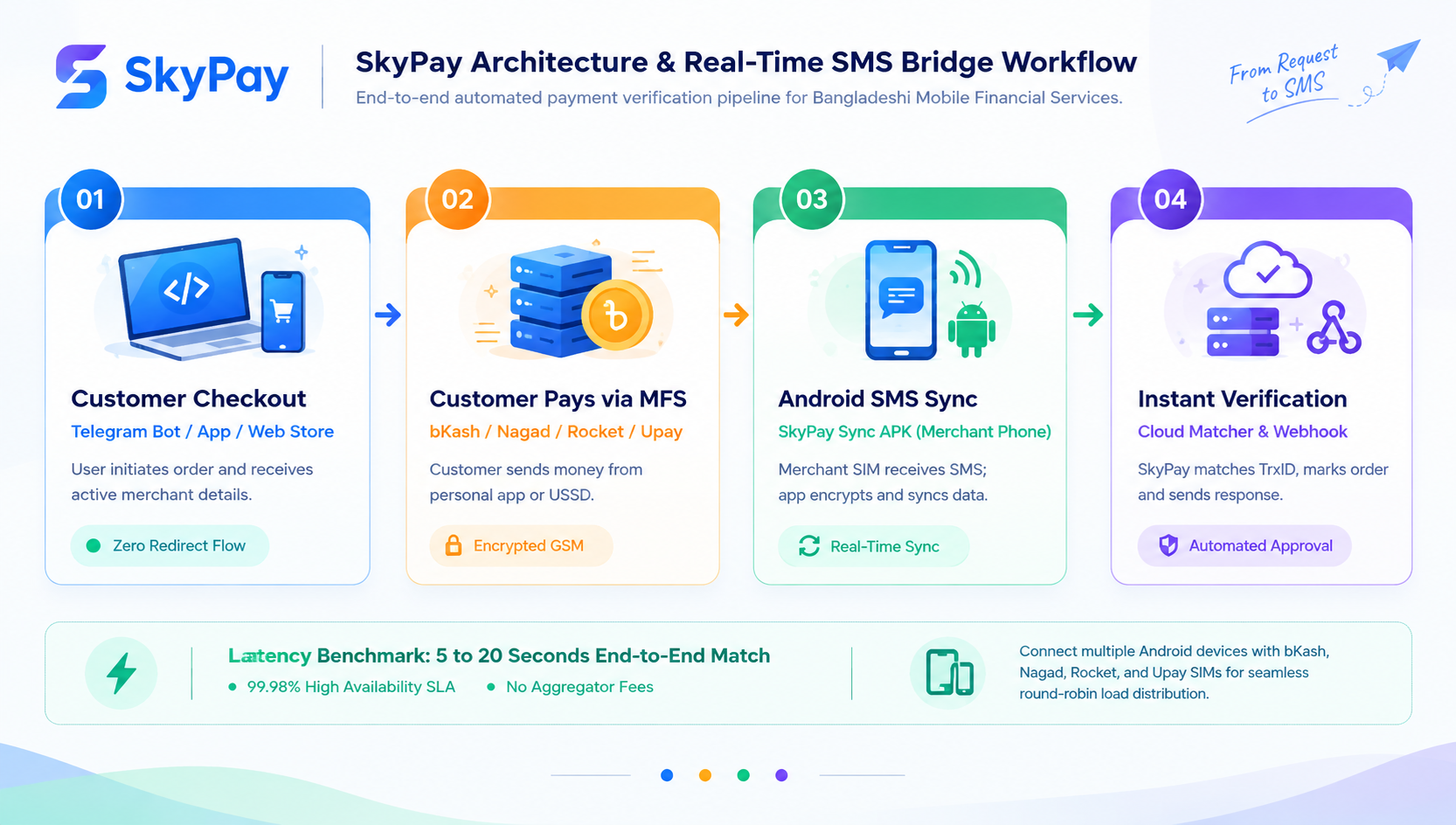
Accept automated bKash, Nagad, Rocket, Upay, and Binance Pay payments inside Telegram bots, mobile applications, and web checkouts with zero manual transaction verification.
Interact In Real-Time
Simulate API sessions, verify incoming transaction IDs, and test webhooks via direct terminal execution.
Hosted Gateway vs. Headless API v2
Choose between hosted web checkout redirection or 100% white-label in-app/bot API execution.
| Dimension | Hosted Gateway (v1) | Headless API (v2) |
|---|---|---|
| Checkout Flow | Browser redirect to SkyPay hosted checkout page | 100% In-App / In-Bot (Zero external redirect) |
| User Interface | Pre-built responsive SkyPay hosted page | Custom interface designed by merchant / bot chat |
| Telegram & Chatbot Support | Opens external browser payment link | Native interactive chat buttons & text replies |
| Session Identifier | Unique checkout identifier returned in URL / response | Unique session id returned in JSON response |
| Authentication Headers | BRAND-KEY (or API-KEY / SECRET-KEY) | BRAND-KEY |
| Active MFS Numbers | Displayed automatically on hosted UI | Returned dynamically in /create JSON payload |
| Required Input Data | amount, success_url, cancel_url | cus_name, amount |
| Best Suited For | WordPress, WooCommerce, WHMCS, SMM Panels, Webstores | Telegram Bots, Discord Bots, Mobile Apps, SPAs |
Authentication & HTTP Headers
Every API call to SkyPay endpoints requires merchant identification. You only need your Brand Key.
| Header Key / Alias | Type | Status | Description |
|---|---|---|---|
| BRAND-KEY | String | Recommended | Your merchant brand key from Dashboard → Brands. This is the primary header key and the only accepted header for Headless API v2. Also works on Hosted Gateway v1. |
| API-KEY / SECRET-KEY | String | v1 Only | Direct aliases of your Brand Key, supported only on Hosted Gateway v1. Pass your Brand Key value into either of these headers if your existing v1 integration expects an API-KEY or SECRET-KEY format. Not supported on Headless API v2 — v2 requires BRAND-KEY exactly. |
| Content-Type | String | Required | Must be set to application/json when making POST requests with JSON payload. |
| Accept | String | Optional | Recommended: application/json. |
BRAND-KEY is the single credential behind all three header names. On Hosted Gateway v1, you may supply it as BRAND-KEY, API-KEY, SECRET-KEY, or the request body parameter api_key — all four are accepted interchangeably. On Headless API v2, only the BRAND-KEY header is accepted; the API-KEY / SECRET-KEY aliases and the ?api_key= query parameter do not work on v2 endpoints. Never share or expose this key in public client-side JavaScript or mobile frontend bundles. Headless Payment API — In-App & Telegram Bot Flow
A seamless, 3-step zero-redirect architecture designed for Telegram bots, native Android/iOS apps, and single-page applications.
Initializes a pending payment session and returns the active merchant wallet numbers currently synchronized on your connected Android devices.
| Parameter | Type | Status | Description |
|---|---|---|---|
| cus_name | String | Required | Full name of customer or Telegram username. |
| amount | Numeric | Required | Total payable amount in BDT (natural number or 2 decimal places). |
| meta_data | Object / JSON | Optional | Arbitrary custom metadata (e.g. Telegram user ID, plan ID, invoice ref). |
{ "cus_name": "Siyam Ahmed", "amount": 500, "meta_data": { "telegram_user_id": 12345678, "product_id": "VIP_SUB_01" }}{ "status": true, "id": "a1b2c3d4e5f6g7h8", "brand": { "name": "My Tech Store", "mobile": "017XXXXXXXX", "whatsapp": "017XXXXXXXX", "email": "support@mytechstore.com" }, "methods": [ { "name": "bkash", "active_payments": { "personal": true, "agent": false, "payment": true }, "personal": "01761844968", "agent": "", "payment": "01761844968" }, { "name": "nagad", "active_payments": { "personal": true, "agent": false }, "personal": "01761844968", "agent": "" }, { "name": "rocket", "active_payments": { "personal": true, "agent": false }, "personal": "017257649946", "agent": "" }, { "name": "upay", "active_payments": { "personal": true, "agent": false }, "personal": "017284684646", "agent": "" }, { "name": "binance", "active_payments": { "personal": true, "merchant": false }, "personal": "712345678", "currency": "USDT", "dollar_rate": "119.50", "amount_usdt": "4.1841" } ]} When your backend receives the response from /create, present the active wallet numbers to the customer directly in Telegram or your app screen.
💳 Order #VIP_SUB_01 | Payable: 500 BDTPlease send the exact amount to any of our official wallets:• bKash (Personal): 01761844968 (Send Money)• Nagad (Personal): 01761844968 (Send Money)• Rocket (Personal): 017257649946 (Send Money)• Binance Pay (USDT): 712345678 — Send exactly 4.1841 USDTAfter completing the payment in your MFS app or Binance app, reply with your Transaction ID / Order ID:When the customer submits their TrxID into your bot or custom checkout screen, your backend sends a verification request to match incoming device SMS records.
| Parameter | Type | Status | Description |
|---|---|---|---|
| id | String | Required | The payment session ID returned by /create. |
| method | String | Required | Channel in strict lowercase: bkash, nagad, rocket, upay, or binance. |
| transaction_id | String | Required | The SMS Transaction ID (TrxID) for bKash / Nagad / Rocket / Upay, or the Binance Order ID when method is binance. Supported aliases: order_id, order, trx_id, transactionId, transaction. |
{ "id": "a1b2c3d4e5f6g7h8", "method": "bkash", "transaction_id": "BLA38KDK2M"}{ "status": true, "message": "Payment verified successfully.", "data": { "cus_name": "Siyam Ahmed", "cus_email": "headless@skypaybd.top", "amount": 500, "transaction_id": "BLA38KDK2M", "meta_data": { "telegram_user_id": 12345678, "product_id": "VIP_SUB_01" }, "payment_method": "bkash", "status": "COMPLETED" }}| HTTP Status | Response Message | Root Cause & Recommendation |
|---|---|---|
| 400 | Invalid transaction ID or transaction already used. | TrxID does not match incoming SMS logs or was already claimed by another order. |
| 404 | Payment session not found or expired. | Session ID expired or does not exist. Prompt user to re-initiate order. |
| 400 | This payment session has already been completed. | Session already confirmed. Prevent double fulfillment. |
| 400 | Unsupported payment method supplied. | Ensure method is lowercase: bkash, nagad, rocket, upay, or binance. |
| 400 | Transaction not found. Please check Order ID. | (Binance only) The submitted Order ID does not match any Binance Pay transaction. |
| 400 | Receiver UID does not match. | (Binance only) The customer sent USDT to a different Binance UID than the one configured for your brand. |
| 400 | Only USDT payments are accepted. | (Binance only) Customer sent a currency other than USDT. |
| 400 | Insufficient amount received. Expected X USDT but received Y USDT. | (Binance only) Customer sent less than the exact amount_usdt value (outside the ±0.0005 USDT tolerance). |
| 400 | This Order ID has already been used. | (Binance only) The Order ID was already committed to a previous session. |
| 401 | Invalid or inactive BRAND-KEY provided. | Check your active BRAND-KEY in SkyPay Merchant Dashboard. |
| 502 | Failed to communicate with Binance. Please try again. | (Binance only) Binance's service is temporarily unreachable. Retry after a short delay. |
curl -X POST https://core.skypaybd.top/api/v2/payment/create \ -H "BRAND-KEY: your_active_brand_key" \ -H "Content-Type: application/json" \ -d '{ "cus_name": "Siyam Ahmed", "amount": 500, "meta_data": { "telegram_user_id": 12345678, "order_id": "ORD-9281" } }'curl -X POST https://core.skypaybd.top/api/v2/payment/verify \ -H "BRAND-KEY: your_active_brand_key" \ -H "Content-Type: application/json" \ -d '{ "id": "a1b2c3d4e5f6g7h8", "method": "bkash", "transaction_id": "BLA38KDK2M" }'<?phpfunction createPaymentSession($name, $amount, $brandKey) { $ch = curl_init('https://core.skypaybd.top/api/v2/payment/create'); curl_setopt_array($ch, [ CURLOPT_RETURNTRANSFER => true, CURLOPT_POST => true, CURLOPT_POSTFIELDS => json_encode([ 'cus_name' => $name, 'amount' => $amount ]), CURLOPT_HTTPHEADER => [ 'BRAND-KEY: ' . $brandKey, 'Content-Type: application/json' ] ]); $response = curl_exec($ch); curl_close($ch); return json_decode($response, true);}function verifyPayment($sessionId, $method, $trxId, $brandKey) { $ch = curl_init('https://core.skypaybd.top/api/v2/payment/verify'); curl_setopt_array($ch, [ CURLOPT_RETURNTRANSFER => true, CURLOPT_POST => true, CURLOPT_POSTFIELDS => json_encode([ 'id' => $sessionId, 'method' => strtolower($method), 'transaction_id' => $trxId ]), CURLOPT_HTTPHEADER => [ 'BRAND-KEY: ' . $brandKey, 'Content-Type: application/json' ] ]); $response = curl_exec($ch); curl_close($ch); return json_decode($response, true);}<?phpuse GuzzleHttp\Client;$client = new Client(['base_uri' => 'https://core.skypaybd.top/']);$response = $client->post('api/v2/payment/create', [ 'headers' => [ 'BRAND-KEY' => 'your_active_brand_key', 'Content-Type' => 'application/json' ], 'json' => [ 'cus_name' => 'Siyam Ahmed', 'amount' => 500 ]]);$data = json_decode($response->getBody(), true);$verifyResponse = $client->post('api/v2/payment/verify', [ 'headers' => [ 'BRAND-KEY' => 'your_active_brand_key', 'Content-Type' => 'application/json' ], 'json' => [ 'id' => $data['id'], 'method' => 'bkash', 'transaction_id' => 'BLA38KDK2M' ]]);$result = json_decode($verifyResponse->getBody(), true);const axios = require('axios');const API_BASE = 'https://core.skypaybd.top/api/v2/payment';const BRAND_KEY = 'your_active_brand_key';async function createSession(cusName, amount) { const { data } = await axios.post(`${API_BASE}/create`, { cus_name: cusName, amount: amount }, { headers: { 'BRAND-KEY': BRAND_KEY, 'Content-Type': 'application/json' } }); return data;}async function verifyTrx(sessionId, method, trxId) { const { data } = await axios.post(`${API_BASE}/verify`, { id: sessionId, method: method.toLowerCase(), transaction_id: trxId }, { headers: { 'BRAND-KEY': BRAND_KEY, 'Content-Type': 'application/json' } }); return data;}import requestsAPI_BASE = "https://core.skypaybd.top/api/v2/payment"BRAND_KEY = "your_active_brand_key"def create_session(cus_name, amount): headers = { "BRAND-KEY": BRAND_KEY, "Content-Type": "application/json" } payload = {"cus_name": cus_name, "amount": amount} res = requests.post(f"{API_BASE}/create", json=payload, headers=headers) return res.json()def verify_payment(session_id, method, transaction_id): headers = { "BRAND-KEY": BRAND_KEY, "Content-Type": "application/json" } payload = { "id": session_id, "method": method.lower(), "transaction_id": transaction_id } res = requests.post(f"{API_BASE}/verify", json=payload, headers=headers) return res.json()package mainimport ( "bytes" "encoding/json" "net/http")func verifyTrx(sessionID, method, trxID, brandKey string) (*http.Response, error) { payload, _ := json.Marshal(map[string]string{ "id": sessionID, "method": method, "transaction_id": trxID, }) req, _ := http.NewRequest( "POST", "https://core.skypaybd.top/api/v2/payment/verify", bytes.NewBuffer(payload), ) req.Header.Set("BRAND-KEY", brandKey) req.Header.Set("Content-Type", "application/json") return http.DefaultClient.Do(req)}Hosted Checkout Gateway — Web Redirect Flow
Generates a hosted payment URL where customers choose their preferred channel — bKash, Nagad, Rocket, Upay, or Binance Pay — on a pre-built secure payment page.
/api/v2/payment/create response once active. | Parameter | Type | Status | Description |
|---|---|---|---|
| amount | Numeric | Required | Payable amount in BDT (Integer or Decimal, range 1 to 1,000,000). |
| success_url | String (URL) | Required | Valid callback URL where customer is redirected after successful payment. |
| cancel_url | String (URL) | Required | Valid callback URL where customer is redirected if they cancel payment. |
| meta_data | Object / JSON | Recommended | Custom metadata payload (e.g. order_id, user_id). Supported alias: metadata. Must be an object, array, or JSON string. |
| cus_name | String | Optional | Customer's full name. Supported aliases: customer_name, c_name, name. Defaults to 'Default Name'. |
| cus_email | String | Optional | Customer email address. Supported aliases: customer_email, c_email, email. Defaults to 'default@gmail.com'. |
| webhook_url | String (URL) | Optional | Webhook notification URL. When configured, an automated server-to-server POST request is dispatched instantly upon payment completion. |
| return_type | String | Optional | HTTP redirect method for callback URLs (GET or POST). Defaults to GET. |
{ "amount": 250.00, "success_url": "https://mystore.com/payment/success", "cancel_url": "https://mystore.com/payment/cancel", "webhook_url": "https://mystore.com/api/payment-webhook", "cus_name": "John Doe", "cus_email": "customer@gmail.com", "meta_data": { "order_id": "ORD-10928", "user_id": 4821 }}{ "status": true, "message": "Payment URL generated successfully.", "payment_url": "https://core.skypaybd.top/api/execute/f7b3a9c2d1e0f8"}{ "status": false, "message": "The success_url field is required."}Verify transaction status on your server using the unique transaction ID. The system validates the ID against connected device SMS logs for bKash / Nagad / Rocket / Upay, or against Binance's servers directly when the customer paid with a Binance Order ID — the endpoint and request shape are identical for every channel.
| Parameter | Type | Status | Description |
|---|---|---|---|
| transaction_id | String | Required | The transaction identifier to verify. Supported aliases: transactionId, transactionid, trx_id, trx, transaction. |
{ "transaction_id": "TRX12345678"}{ "status": true, "data": { "cus_name": "John Doe", "cus_email": "customer@gmail.com", "amount": 250.00, "transaction_id": "TRX12345678", "meta_data": { "order_id": "ORD-10928", "user_id": 4821 }, "payment_method": "bkash", "status": "COMPLETED" }}| Data Status Value | Meaning | Action Required |
|---|---|---|
| COMPLETED | Payment matched against merchant device SMS and confirmed. | Safely deliver goods, credit account balance, or activate membership. |
| PENDING | Payment initialized but not yet confirmed by SMS synchronization. | Do not fulfill yet; prompt customer to complete the transfer and wait for sync. |
| FAILED | Transaction failed, expired, or invalid credentials. | Payment not successful. Inform customer to re-attempt checkout. |
curl -X POST https://core.skypaybd.top/api/payment/create \ -H "BRAND-KEY: your_active_brand_key" \ -H "Content-Type: application/json" \ -d '{ "amount": 250.00, "success_url": "https://mystore.com/payment/success", "cancel_url": "https://mystore.com/payment/cancel", "webhook_url": "https://mystore.com/api/payment-webhook", "cus_name": "John Doe", "cus_email": "customer@gmail.com", "meta_data": { "order_id": "ORD-10928", "user_id": 4821 } }'curl -X POST https://core.skypaybd.top/api/payment/verify \ -H "BRAND-KEY: your_active_brand_key" \ -H "Content-Type: application/json" \ -d '{ "transaction_id": "TRX12345678" }'<?phpfunction createHostedPayment($amount, $successUrl, $cancelUrl, $brandKey, $metaData = [], $webhookUrl = '', $cusName = '', $cusEmail = '') { $payload = [ 'amount' => $amount, 'success_url' => $successUrl, 'cancel_url' => $cancelUrl, 'meta_data' => $metaData ]; if (!empty($webhookUrl)) { $payload['webhook_url'] = $webhookUrl; } if (!empty($cusName)) { $payload['cus_name'] = $cusName; } if (!empty($cusEmail)) { $payload['cus_email'] = $cusEmail; } $ch = curl_init('https://core.skypaybd.top/api/payment/create'); curl_setopt_array($ch, [ CURLOPT_RETURNTRANSFER => true, CURLOPT_POST => true, CURLOPT_POSTFIELDS => json_encode($payload), CURLOPT_HTTPHEADER => [ 'BRAND-KEY: ' . $brandKey, 'Content-Type: application/json' ] ]); $res = curl_exec($ch); curl_close($ch); return json_decode($res, true);}function verifyHostedPayment($trxId, $brandKey) { $ch = curl_init('https://core.skypaybd.top/api/payment/verify'); curl_setopt_array($ch, [ CURLOPT_RETURNTRANSFER => true, CURLOPT_POST => true, CURLOPT_POSTFIELDS => json_encode([ 'transaction_id' => $trxId ]), CURLOPT_HTTPHEADER => [ 'BRAND-KEY: ' . $brandKey, 'Content-Type: application/json' ] ]); $res = curl_exec($ch); curl_close($ch); return json_decode($res, true);}const axios = require('axios');const BRAND_KEY = process.env.SKYPAY_BRAND_KEY;const API_BASE = 'https://core.skypaybd.top/api/payment';async function createHostedCheckout(order) { const { data } = await axios.post( `${API_BASE}/create`, { amount: order.amount, success_url: order.success_url, cancel_url: order.cancel_url, webhook_url: order.webhook_url, cus_name: order.cus_name, cus_email: order.cus_email, meta_data: order.meta_data }, { headers: { 'BRAND-KEY': BRAND_KEY, 'Content-Type': 'application/json' } } ); return data;}async function verifyHostedCheckout(trxId) { const { data } = await axios.post( `${API_BASE}/verify`, { transaction_id: trxId }, { headers: { 'BRAND-KEY': BRAND_KEY, 'Content-Type': 'application/json' } } ); return data;}import requestsAPI_BASE = "https://core.skypaybd.top/api/payment"BRAND_KEY = "your_active_brand_key"def create_checkout(amount, success_url, cancel_url, meta_data=None, webhook_url=None, cus_name=None, cus_email=None): headers = { "BRAND-KEY": BRAND_KEY, "Content-Type": "application/json" } payload = { "amount": amount, "success_url": success_url, "cancel_url": cancel_url, "meta_data": meta_data or {} } if webhook_url: payload["webhook_url"] = webhook_url if cus_name: payload["cus_name"] = cus_name if cus_email: payload["cus_email"] = cus_email res = requests.post(f"{API_BASE}/create", json=payload, headers=headers) return res.json()def verify_checkout(transaction_id): headers = { "BRAND-KEY": BRAND_KEY, "Content-Type": "application/json" } payload = { "transaction_id": transaction_id } res = requests.post(f"{API_BASE}/verify", json=payload, headers=headers) return res.json()Programmatic SMS Dispatching API
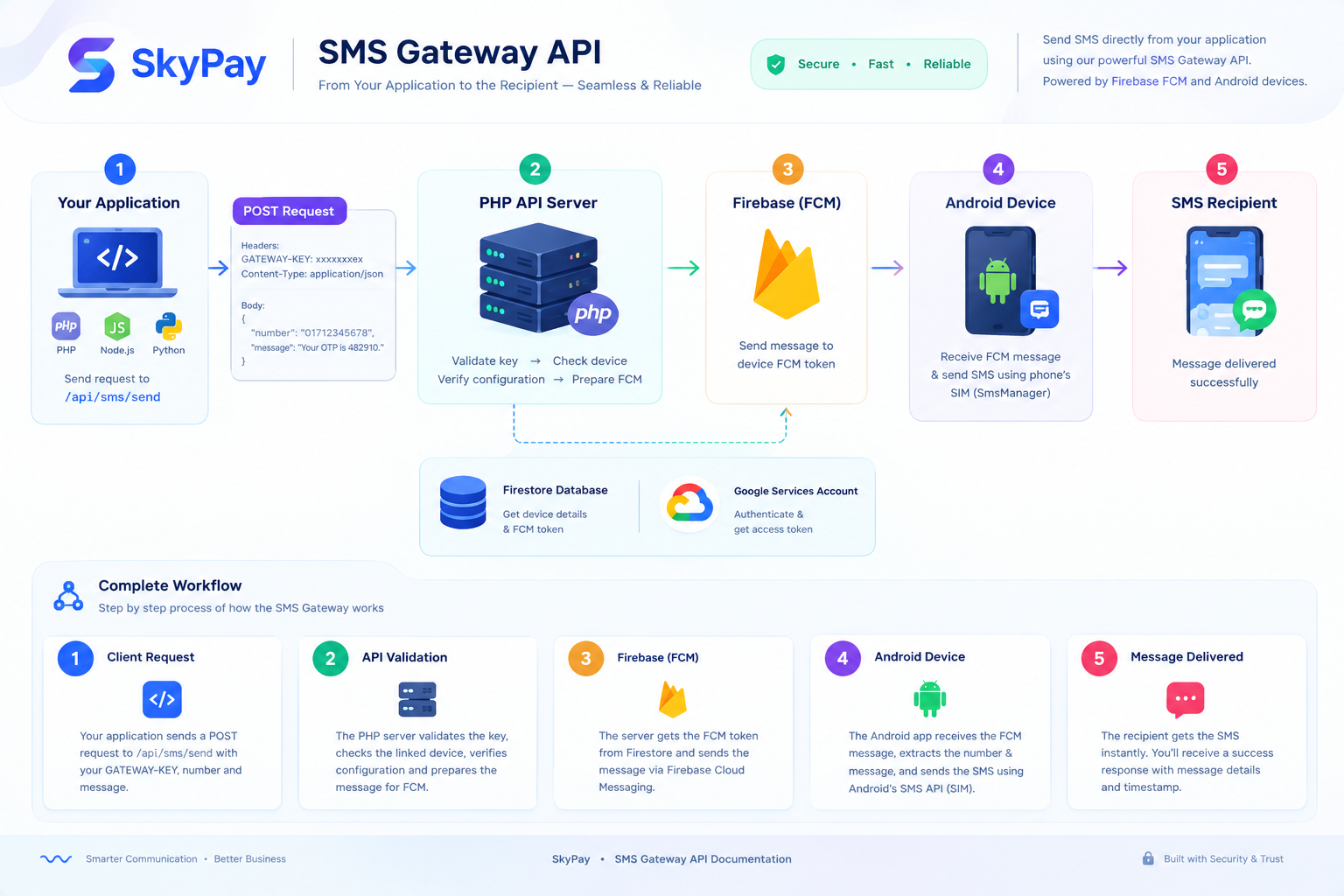
Send SMS programmatically through your linked Android gateway device using a simple JSON POST request. The API authenticates the gateway, resolves the linked device, retrieves its FCM registration token from Firestore, and dispatches the message through Firebase Cloud Messaging to the Android SMS Gateway application.
| Item | Value | Description |
|---|---|---|
| Base URL | https://core.skypaybd.top | The base domain is loaded from the PHP PAYMENT_URL variable, the same dynamic domain used by the payment APIs. |
| Endpoint | /api/sms/send | Endpoint used to queue and dispatch an SMS through the linked Android gateway device. |
| Full URL | https://core.skypaybd.top/api/sms/send | Complete API URL for sending an SMS. |
| Method | POST | Only HTTP POST requests are accepted. |
| Content-Type | application/json | Request payload must be sent as raw JSON. |
Authenticate every request by sending your 18-character SMS Gateway key in the HTTP headers. The server checks the supported headers in the order shown below.
| Header Name | Type | Status | Description |
|---|---|---|---|
| GATEWAY-KEY | String | Recommended | Primary authorization header. Checked first. |
| gateway-key | String | Supported | Alternative authorization header. Checked if GATEWAY-KEY is not provided. |
| key | String | Supported | Alternative authorization header. Checked if the previous supported headers are not provided. |
| Field | Type | Status | Alias | Description |
|---|---|---|---|---|
| number | String | Required | phone | Destination mobile number, for example 01712345678. |
| message | String | Required | text | Text message content to deliver. |
{ "number": "01712345678", "message": "Your verification code is 482910."}curl -X POST "https://core.skypaybd.top/api/sms/send" \ -H "GATEWAY-KEY: YOUR_18_CHAR_GATEWAY_KEY" \ -H "Content-Type: application/json" \ -d '{ "number": "01712345678", "message": "Your verification code is 482910." }'<?php$curl = curl_init();$payload = [ "number" => "01712345678", "message" => "Your verification code is 482910."];curl_setopt_array($curl, [ CURLOPT_URL => "https://core.skypaybd.top/api/sms/send", CURLOPT_RETURNTRANSFER => true, CURLOPT_POST => true, CURLOPT_POSTFIELDS => json_encode($payload), CURLOPT_HTTPHEADER => [ "GATEWAY-KEY: YOUR_18_CHAR_GATEWAY_KEY", "Content-Type: application/json" ],]);$response = curl_exec($curl);curl_close($curl);echo $response;const sendSms = async () => { const response = await fetch("https://core.skypaybd.top/api/sms/send", { method: "POST", headers: { "GATEWAY-KEY": "YOUR_18_CHAR_GATEWAY_KEY", "Content-Type": "application/json" }, body: JSON.stringify({ number: "01712345678", message: "Your verification code is 482910." }) }); const result = await response.json(); console.log(result);};sendSms();import requestsurl = "https://core.skypaybd.top/api/sms/send"headers = { "GATEWAY-KEY": "YOUR_18_CHAR_GATEWAY_KEY", "Content-Type": "application/json"}payload = { "number": "01712345678", "message": "Your verification code is 482910."}response = requests.post(url, json=payload, headers=headers)print(response.json()){ "status": true, "message": "SMS queued successfully for delivery.", "data": { "number": "01712345678", "text": "Your verification code is 482910.", "device_name": "My Android Phone", "device_ip": "192.168.1.100", "message_id": "0:1234567890abcdef", "timestamp": "2025-01-15 10:30:45" }}| HTTP Code | Error | Response Message | Meaning |
|---|---|---|---|
| 405 | Method Not Allowed | Method not allowed. Only POST requests are accepted. | Request method is not POST. |
| 401 | Missing Gateway Key | GATEWAY-KEY header is required. | No supported gateway key header was provided. |
| 401 | Invalid / Inactive Key | Invalid or inactive GATEWAY-KEY provided. | The supplied gateway key does not exist or is inactive. |
| 404 | Device Not Found | Linked device not found. | The gateway key is valid, but no linked device record exists. |
| 400 | Device Offline | Target device is offline or inactive. | The linked device has no IP address or is inactive. |
| 400 | Owner Not Resolvable | Unable to resolve device owner email. | The server cannot determine the device owner's email address. |
| 400 | Device Key Missing | Device key is missing. | The linked device record does not contain a device key. |
| 400 | Required Fields Missing | Both number and text fields are required. | Recipient number/phone or message/text is missing or empty. |
| 500 | Configuration Error | Server configuration missing: google-services.json not found. | Required Firebase configuration file is missing. |
| 500 | Configuration Error | Firebase Project ID missing in configuration. | Firebase Project ID is not available in the server configuration. |
| 500 | Configuration Error | Server configuration missing: service-account.json not found. | Firebase service account credentials are missing. |
| 500 | Authentication Error | Failed to generate Firebase authentication token. | The server could not generate a Firebase authentication token. |
| 502 | Firestore Error | Device record not found on datastore. | The device document could not be fetched from Firestore. |
| 404 | FCM Token Not Found | FCM registration token not found for this device. | The Firestore device document exists, but no FCM registration token is stored. |
| 4xx / 502 | FCM Delivery Failure | <FCM error message here> | Firebase Cloud Messaging rejected or failed to process the message. |
Client Request │ ▼[Method Check] ──── Not POST ──────────────────────► 405 Method Not Allowed │ ▼[Gateway Key Check] ── Missing ────────────────────► 401 GATEWAY-KEY required │ ▼[DB: Validate Key] ── Invalid / Inactive ──────────► 401 Invalid or inactive key │ ▼[DB: Fetch Device] ── Not Found ───────────────────► 404 Linked device not found │ ▼[Device IP Check] ── Empty ────────────────────────► 400 Device offline or inactive │ ▼[Resolve Owner Email] ── Not Found ────────────────► 400 Unable to resolve email │ ▼[Device Key Check] ── Missing ─────────────────────► 400 Device key is missing │ ▼[Validate Fields] ── number/message empty ─────────► 400 Fields required │ ▼[Firebase Config] ── Missing files / bad config ───► 500 Server config error │ ▼[Get Firebase Token] ── Failed ────────────────────► 500 Auth token error │ ▼[Firestore: Get FCM Token] ── Failed ──────────────► 502 / 404 │ ▼[FCM: Send Message] ── Failed ─────────────────────► 4xx / 502 │ ▼ 200 OK — SMS queued successfullyPlugins, Modules & Developer Toolkits
Install production-ready integrations for WordPress, WHMCS, SMM panels, Android apps, and developer documentation.
WordPress & WooCommerce
Native WooCommerce payment gateway plugin with instant order status update and automated callback verification.
WHMCS Billing Module
Automated web hosting invoice payment module for WHMCS 7.x & 8.x with zero-delay service provisioning.
SMM Panel Auto-Deposit
Auto-balance deposit gateway for SmartPanel and standard SMM scripts with duplicate TrxID fraud protection.
Sketchware SWB Project
Pre-configured block project file for Sketchware mobile developers to accept in-app payments easily.
SkyPay Merchant Sync APK
Official background hardware sync app for merchant Android phones with active bKash, Nagad, Rocket SIMs.
Developer Offline Docs & AI Specs
Complete Markdown API specifications, Postman collections & JSON schemas for AI coding agents and local testing.
HTTP Status Codes & Integration Checklist
Follow standard API responses and best practices to ensure seamless production reliability.
| HTTP Code | Status | Meaning & Resolution |
|---|---|---|
| 200 | OK | Request processed successfully. Check status: true in JSON payload. |
| 400 | Bad Request | Missing required parameter, invalid amount, or mismatched transaction ID. |
| 401 | Unauthorized | Missing or invalid BRAND-KEY, API-KEY, or SECRET-KEY. |
| 403 | Forbidden | Invalid or inactive brand credentials provided. |
| 404 | Not Found | Payment session or transaction record not found. |
| 422 | Unprocessable Entity | Validation error on specific field (e.g. invalid URL, amount out of range, malformed JSON). |
| 500 | Internal Error | Database insertion or gateway system error. Please contact technical support. |
meta_data, always provide a valid object or valid JSON-encoded string to avoid 422 errors.- Store BRAND-KEY in server .env files, never in public client code.
- Implement idempotency checks in your database to prevent duplicate fulfillment.
- Provide a 10–20 second retry window for customer SMS matching.
- Keep the merchant Android sync smartphone plugged into power 24/7.